
Download ColorMagic – AI‑Powered Color Palette Generator for Designers, Creators & Developers
Overview
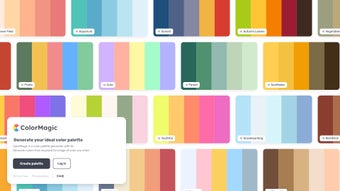
ColorMagic is a modern, AI‑driven color palette generator that transforms simple keywords into vivid, ready‑to‑use color schemes. Whether you are designing a website, crafting a brand identity, or looking for inspiration for an illustration, you can type in a word—such as “sunset,” “unicorn,” “winter,” or “energetic”—and instantly receive a harmonious set of colors that match the mood of the term. The platform supports multiple languages, making it accessible for a global audience, and offers a streamlined login experience, detailed terms of use, and a transparent privacy policy.
While it does not provide deep manual adjustments, its strength lies in speed, accuracy, and the breadth of thematic options. Users appreciate the effortless workflow: just type, click, and copy the palette into any design tool. The service is delivered via a secure web app, meaning you can download the generated palettes to your local machine or integrate them directly into design software through copy‑paste.
ColorMagic’s AI model has been trained on millions of existing palettes, ensuring each suggestion adheres to color theory best practices while still feeling fresh and creative. This extensive training set also enables the engine to recognize subtle cultural associations with color, helping designers avoid unintended meanings in international projects. Security is a core pillar of the product: all communications are encrypted with TLS 1.3, user credentials are salted and hashed, and saved palettes are stored in an isolated cloud container that complies with GDPR and CCPA guidelines.
For teams, the cloud sync feature means that a shared workspace can be created, allowing multiple collaborators to view, edit, and comment on palettes in real time. In practice, ColorMagic becomes a reliable companion for UI/UX designers, graphic artists, marketers, and developers who need quick, reliable color inspiration without spending hours tweaking values. Its ability to turn abstract concepts into concrete visual assets accelerates the ideation phase, shortens feedback loops, and ultimately helps bring products to market faster.
Key Features & Benefits
- Keyword‑Based Generation: Input any word or phrase and receive a complete palette instantly.
- AI‑Enhanced Accuracy: Trained on a massive dataset of successful palettes, the algorithm respects contrast, harmony, and accessibility.
- Multi‑Lingual Support: Works with keywords in English, Spanish, French, German, Chinese, Japanese and many more.
- Instant Copy & Export: One‑click copy of HEX, RGB, and HSL values; export as PNG, CSS, or JSON.
- Secure Login & Cloud Sync: Save favorite palettes to your account and access them from any device.
- Responsive Web Interface: Fully functional on Windows, macOS, Android, and iOS browsers.
- Detailed Documentation: Clear terms of use, privacy policy, and help center to guide new users.
The benefits of these features go beyond mere convenience. By generating palettes from semantic concepts, designers can align visual identity with brand messaging more intuitively. The AI’s understanding of contrast ensures that text legibility and WCAG compliance are baked into every suggestion, reducing the need for separate accessibility checks. Multi‑lingual capability opens doors for agencies working with international clients, allowing them to experiment with culturally resonant color vocabularies. Moreover, the cloud‑based saving mechanism means that project teams can share palettes instantly, keeping creative collaboration fluid and organized.
For freelancers, the rapid turnaround translates into more billable hours and happier clients, while in‑house teams can accelerate prototype cycles, moving from concept to prototype in minutes rather than days. The export options also cater to developers: a JSON file can be fed directly into design‑system tokens, while a CSS file plugs straight into style sheets, eliminating manual transcription errors. Finally, the responsive design guarantees that whether you are on a high‑resolution desktop monitor or a mobile phone on a coffee break, the experience remains smooth, ensuring that inspiration never stalls because of a clunky interface.
Installation, Usage & Compatibility
How to Get Started
ColorMagic is a web‑based application, so there is no traditional “install” process. To begin, simply navigate to the official ColorMagic website using any modern browser (Chrome, Edge, Firefox, Safari). Click the “Sign Up” button, fill in your email address, and create a secure password. After verifying your account through the confirmation email, you’ll be logged into the dashboard where the main generator resides.
Generating a Palette
Enter a keyword in the central search bar—examples include “forest,” “candy,” “retro,” or “tech”. Press “Generate” and the AI instantly renders a five‑color palette. Each swatch displays HEX, RGB, and HSL values. Use the copy icons to transfer any value to your clipboard, or click “Export” to download the entire set as a CSS file, JSON configuration, or a high‑resolution PNG swatch sheet. The interface also offers a “Refresh” button to produce alternative palettes for the same keyword, giving you a quick way to iterate.
System Requirements
- Windows 10 or later – any modern browser
- macOS 10.14 (Mojave) or later – Safari, Chrome, or Firefox
- Android 8.0 (Oreo) or later – Chrome or Firefox mobile
- iOS 13 or later – Safari or Chrome
Because the service runs entirely in the cloud, it does not consume local CPU or GPU resources, making it ideal for low‑spec machines. All data processing occurs on secure servers with SSL encryption, ensuring that your login credentials and saved palettes remain private.
Updates & Support
ColorMagic receives weekly updates that improve the AI model, add new language packs, and refine the UI. Users are notified via email and an in‑app banner. If you encounter any issues, the help center provides step‑by‑step guides, and live chat support is available during business hours. The developers also maintain an active community forum where users share tips, custom export scripts, and inspiration boards.
Pros, Cons, FAQ & Final Thoughts
Pros & Cons
- Pros
- Lightning‑fast palette generation from any keyword.
- AI ensures color harmony and accessibility compliance.
- Multi‑language support expands creative possibilities.
- Cloud sync lets you access palettes on any device.
- No installation required; works in any modern browser.
- Cons
- Lacks deep manual adjustment tools (e.g., hue shifting, saturation sliders).
- Limited to five‑color palettes per generation; larger schemes need multiple runs.
- Free tier restricts the number of saved palettes per month.
Frequently Asked Questions
-
Is ColorMagic completely free?
ColorMagic offers a robust free tier that includes unlimited palette generation and basic cloud saving. A premium subscription unlocks unlimited saved palettes, higher export resolutions, and priority support.
-
Can I use the generated palettes for commercial projects?
Yes. All palettes created with ColorMagic are royalty‑free and can be used in commercial designs, branding, UI kits, and marketing material without attribution.
-
How does the AI ensure accessibility?
The AI evaluates contrast ratios against WCAG 2.1 standards while building each palette, automatically adjusting hues to meet minimum contrast thresholds for text readability.
-
Do I need an internet connection to use ColorMagic?
Because all processing occurs on remote servers, an active internet connection is required for generation and syncing. However, exported files can be used offline after download.
-
Can I integrate ColorMagic with design tools like Figma or Sketch?
While there is no direct plugin yet, exported CSS or JSON files can be imported into most design systems, and the copy‑paste workflow works smoothly with Figma, Sketch, Adobe XD, and similar applications.
Conclusion & Call to Action
ColorMagic bridges the gap between creative inspiration and practical execution by turning abstract ideas into concrete color palettes in seconds. Its AI engine delivers aesthetically balanced schemes while respecting accessibility guidelines, making it a trustworthy ally for professionals and hobbyists alike. Although power users may miss granular control, the tool’s speed, multilingual capability, and seamless cloud integration more than compensate for those limitations. If you’re looking to accelerate your design workflow, enhance brand storytelling, or simply explore new color territories, download ColorMagic today and experience the convenience of keyword‑driven color creation.
ColorMagic offers a fresh, AI‑powered approach to palette generation that feels both intuitive and reliable. The only drawback is the absence of deep manual tweaks, but for most designers seeking rapid inspiration, it hits the mark.



.png)



